· via Hacker News – Front Page (native)
OpenShot 4.0 adds built-in screen and webcam recording plus professional color grading
OpenShot 4.0 adds direct capture of screen, webcam and audio, a color grading suite with wheels, curves, LUTs and scopes, and machine learning masking that runs locally, all in the free open-source editor.
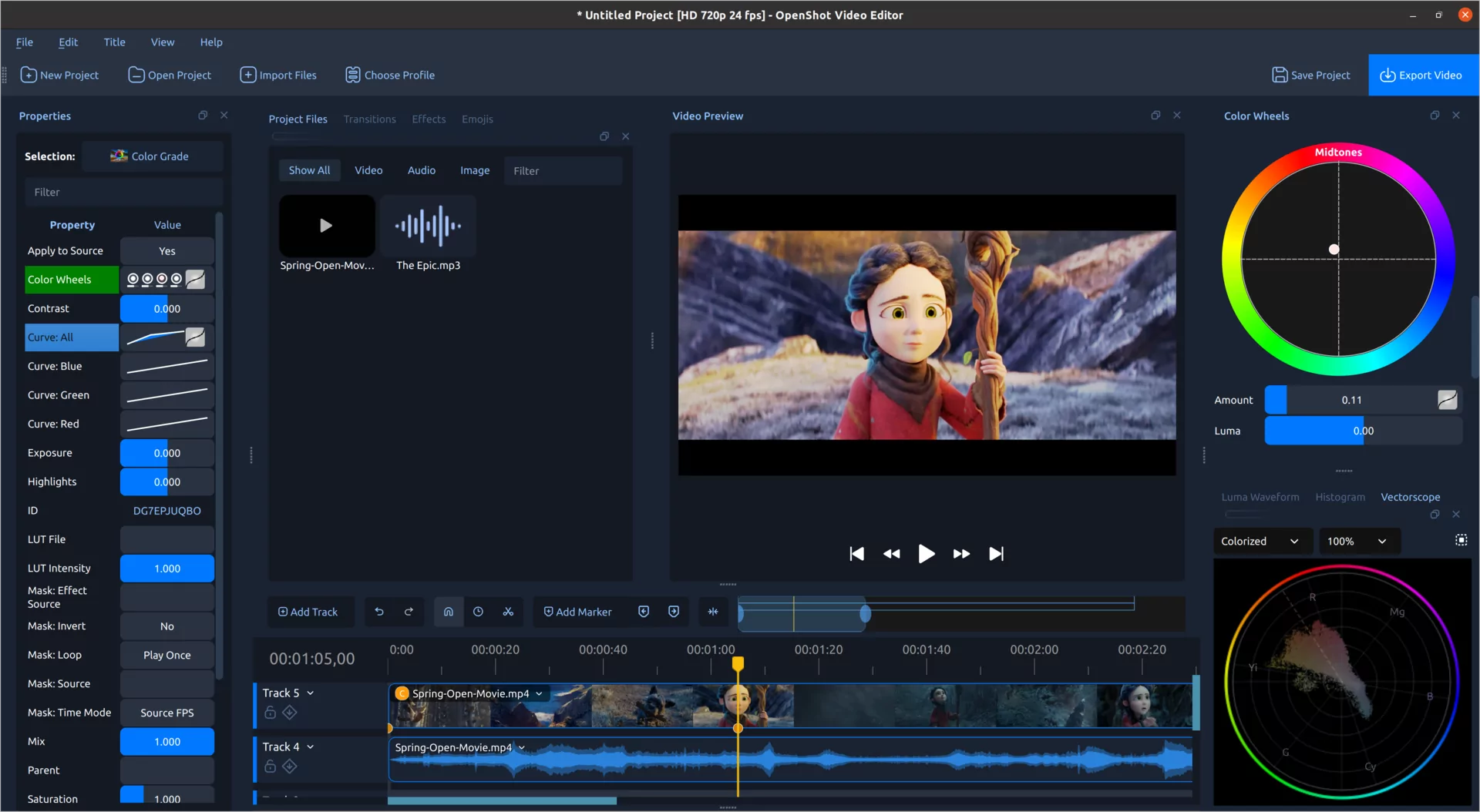
OpenShot, the free and open-source video editor, has shipped version 4.0, an update the project describes as one of the biggest workflow upgrades in its history. Announced on the OpenShot blog and picked up on Hacker News's front page, the release adds built-in recording for screens, webcams and microphones, a dedicated color grading workspace with wheels, curves, LUTs and live video scopes, and ten new effects including a sound-reactive visualizer.
Recording without leaving the editor
The new Recording View captures a microphone, the desktop, a webcam or system audio — or several sources at once — directly into an open project. According to OpenShot, each source is written to its own media file and placed on the timeline as its own clip, so a voice-over can be trimmed or a webcam feed cropped without touching the screen capture. When screen and camera are recorded together, the app can drop the webcam into a rounded picture-in-picture frame automatically, and because those choices are ordinary clip properties they remain editable after recording ends.
The view gives live feedback before and during a session: a microphone meter, a webcam preview, and temporary clips that appear on the timeline and are replaced with the finished media when recording stops. A right-click menu option on any clip starts a quick voice-over workflow by jumping to the clip's start and opening the recording controls, and a No Track mode records multiple takes into the project's files without adding them to the timeline. Recordings are stored in the project's assets folder. Capture relies on platform-native paths on Windows, macOS, Linux X11 and Linux Wayland with PipeWire, and the available screen, window, camera and system-audio options vary by platform and permissions.
A full color grading workspace
Version 4.0 also introduces a Color View built around a large preview, with clip properties, color wheels and live video scopes. It opens via a right-click menu on a clip, which adds a new Color Grade effect and selects it. OpenShot frames the tools as approachable for non-colorists, with room to grow into the advanced controls.
The Color Grade effect combines correction controls (exposure, contrast, temperature, tint, highlights, shadows, saturation and vibrance) with grading tools: separate wheels for the whole image, shadows, midtones and highlights, plus four editable curves covering the full picture and the individual red, green and blue channels, with movable Bézier handles. Industry-standard .cube LUT files are supported with an intensity control for blending a look into the corrected image rather than applying it at full strength, and every parameter can be keyframed so grades can evolve over a shot or animate a transition.
Four scopes — Luma Waveform, Histogram, RGB Parade and Vectorscope — update as the project plays, and each includes a Region tool that restricts analysis to a drawn area such as a face, sky or product. The vectorscope adds a skin-tone reference line for spotting color casts. One-click presets like Auto Contrast, Lift Shadows, Warm Up and Boost Color apply the same editable effect, making them starting points rather than fixed filters. A new color chapter in the OpenShot User Guide covers correction, grading, scopes, curves, wheels and LUTs.
Effects, local AI and performance
Ten new effects join the video engine. The Audio Visualization effect turns sound into animated waveforms, bars, radial patterns, spectrum displays, particles and VU-style meters, with controls for color, frequency range, channels, detail and glow. The batch also covers beat-synced flashes, cinematic film looks, animated timers and footage cleanup.
OpenShot 4.0 can isolate and follow subjects using machine learning models that run on the user's own computer. The models are free downloads, and the project says no cloud service or subscription is involved.
The timeline gets smoother zooming, easier keyframes, editable timecode and clearer clips, while OpenShot says performance work makes the Blur effect far faster and improves Sharpen, timeline rendering, video scopes, color grading and audio visualizations. Menus and presets have been reorganized so camera moves, animations and looks are easier to find, and expanded Qt 6 support improves compatibility with newer Linux distributions while laying groundwork for Android and other future platforms.
Why it matters
Screen recording and color grading are two of the most common reasons people move from entry-level editors to paid tools. Folding both into a free, open-source application narrows the gap with commercial suites, and it does so with a grading model — wheels, curves, LUTs, scopes and keyframes — that mirrors how professional colorists actually work. Built-in recording also removes a familiar multi-step workflow of capturing in one app and importing into another, which matters for tutorials, podcasts, commentary and reaction videos. And the locally run AI masking is a small but telling signal of where consumer creative software is heading: machine learning features that do not require a cloud account or subscription.
- #open-source
- #video-editing
- #color-grading
- #screen-recording
- #desktop-software