· via Hacker News – Front Page (hnrss.org)
SpeedCrunch 1.1 released: high-precision open-source scientific calculator for Windows, macOS and Linux
Version 1.1 of SpeedCrunch, the free open-source scientific calculator, offers up to 50 digits of precision, complex numbers, vectors and matrices on Windows, macOS and Linux, and reached the Hacker News front page.
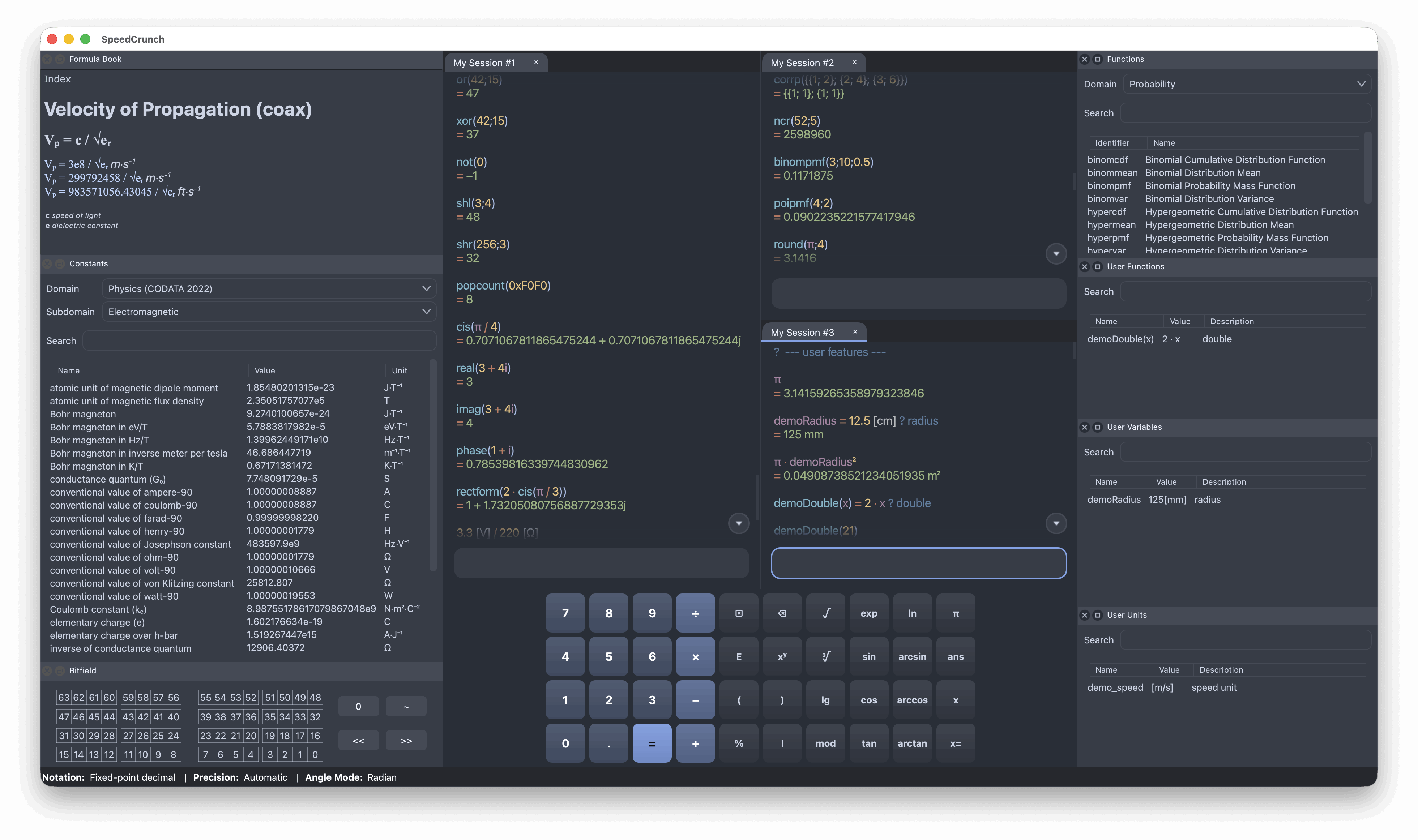
SpeedCrunch, a free and open-source scientific calculator, has shipped version 1.1, and the release drew wide attention after reaching the Hacker News front page on 24 October 2026. According to the project's website, the application is built for STEM professionals, students and teachers, and runs on Windows, macOS and Linux.
High-precision arithmetic at the core
The headline capability, according to SpeedCrunch's site, is arithmetic with up to 50 digits of precision, well beyond the 15 to 17 significant digits of ordinary double-precision arithmetic. For long chains of calculations where rounding errors can compound, that headroom matters. The calculator also handles complex numbers natively, alongside vectors and matrices.
The built-in library spans more than 140 functions, complemented by a wide selection of physical units and constants. Users are not limited to what ships in the box: variables, functions and units can all be user-defined, turning recurring expressions and custom conversions into reusable building blocks.
A calculator built around real work sessions
Several of the listed features describe how the app is meant to be used day to day. Results carry per-result settings, and the calculation history can be rewritten, so an early mistake in a long derivation can be corrected without re-entering everything that followed.
The interface is configurable too. Keypad presets are available, the layout is described as fully customizable, and several calculations can be in flight at once through multiple active sessions arranged in tabs, panes or separate windows. The site also lists more than 40 translations and over 40 color schemes.
One caveat: the project's page presents an overall feature list for the application rather than a change log, so it does not spell out which capabilities arrived specifically in version 1.1.
Free across the major desktop platforms
SpeedCrunch is free to download and use on Windows, macOS and Linux, with a user manual and a donation link available alongside the download. No account or payment is required.
Why it matters
Scientific calculators occupy an awkward spot for technical users. The default options are cheap hardware devices with cramped screens, proprietary desktop software carrying licence fees, or ad-supported web tools that send your working to someone else's server. SpeedCrunch's combination of open-source code, local execution and 50-digit precision offers an alternative that students, teachers and engineers can adopt at no cost, and audit if they need to.
The feature set also reflects what serious users actually need: editable history, parallel sessions, custom functions and units, rather than a digital replica of a pocket calculator. And the fact that a calculator release can still climb the Hacker News front page suggests lasting appetite for focused, native desktop tools that do one job well.
- #open-source
- #speedcrunch
- #calculator
- #desktop-software
- #stem