· via Hacker News – Front Page (native)
Windows 11 component found logging which coding agents and dev tools you run
A reverse-engineering analysis of Windows 11's MissionControlAggregator.dll shows the OS records which coding agents and developer tools you run and reports the data through its diagnostics pipeline unless you opt out.
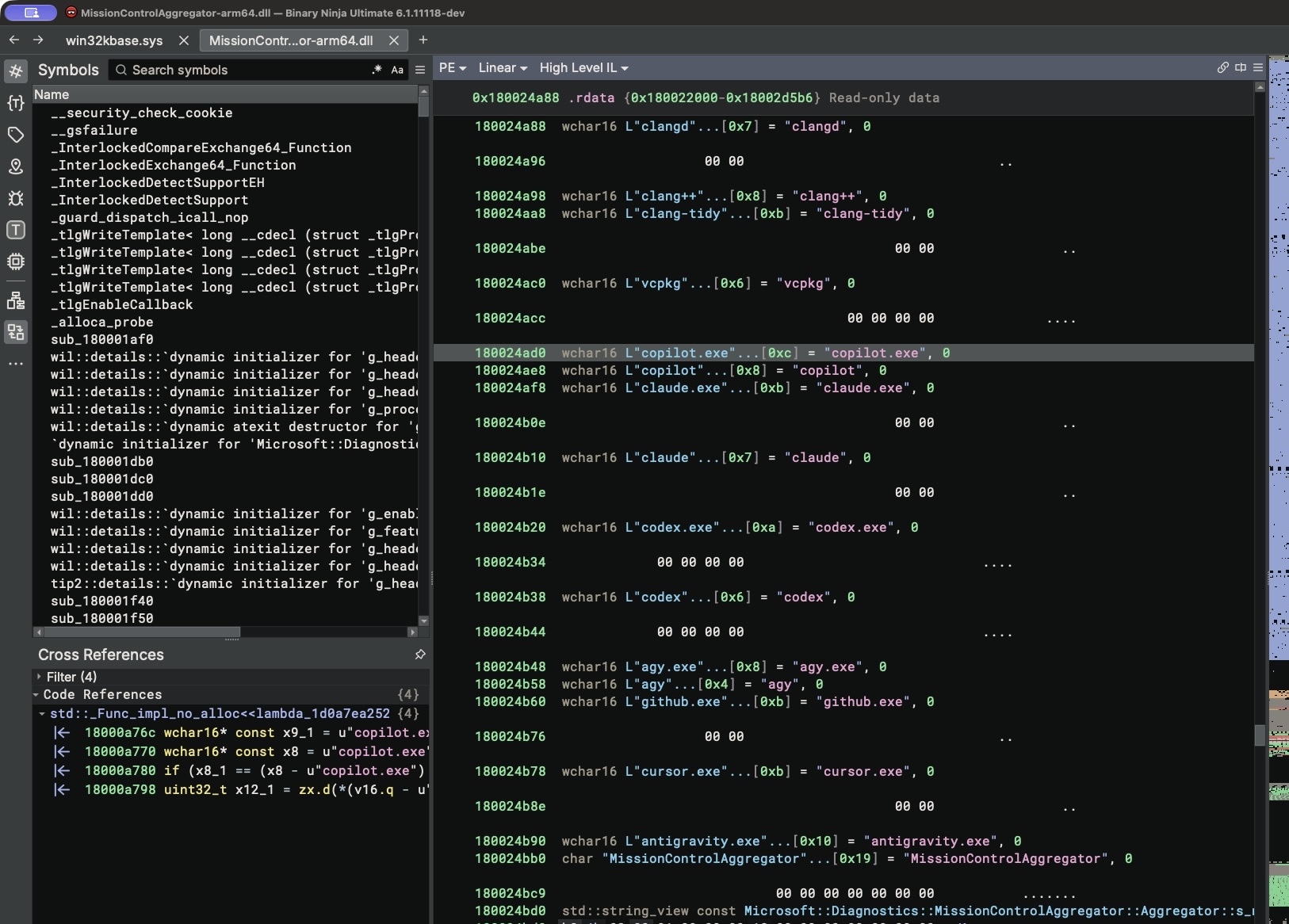
A reverse-engineering analysis of a Windows 11 system component has found that the operating system can detect when specific AI coding agents and developer tools are launched, persist that information on disk, and report it through the Windows diagnostics pipeline. According to the analysis published on xusheng.dev, which reached the front page of Hacker News, the DLL in question matches process names against hard-coded lists of coding assistants and common development tools, then encodes the results as a compact bitmap that is uploaded to Microsoft unless optional diagnostic data — which the researcher notes is enabled by default — has been turned off.
What gets tracked
Inside MissionControlAggregator.dll, the researcher identified four slots for command-line coding agents — copilot.exe, claude.exe, codex.exe and agy.exe, with extensionless equivalents handled on the WSL path — plus five slots for desktop agents: github.exe, claude.exe, codex.exe, cursor.exe and antigravity.exe. A feature named CLICodingAgentUsage, with feature ID 62580080, guards the new agent checks.
The lists reach beyond AI tools. The same component also looks for node.exe, python.exe, dotnet.exe, gcc.exe, clang.exe, gdb.exe, javac.exe, devenv.exe and code.exe, among others, feeding twelve broader tool categories. Some checks validate the binary's publisher — Node.js Foundation for node.exe, the Python Software Foundation for python.exe, and Microsoft Corporation for the .NET and Visual Studio entries — while the group covering GCC and Clang has no publisher check in the code path examined.
How the detection works
Rather than scanning the process list itself, the aggregator subscribes to events the operating system already emits. For Windows programs it consumes KernelProcess.AppStateChangeSummary and Win32kTraceLogging.AppInteractivitySummary; for the Windows Subsystem for Linux it consumes Microsoft.Windows.Lxss.Manager.Exec and ExecCritical, reading the imageName field. Because app-state summaries cover ordinary Windows applications, a native Windows codex.exe still lands in the CLI-agent checks — the WSL route is not a requirement.
A match sets a slot in the component's internal state. On a timer, a reporting routine the analysis identifies as ReportCohorts<12,4,5> — twelve tool categories, four CLI agents, five desktop agents — converts those slots into bitsets and emits an ETW TraceLogging event named Segments.SubCohorts, roughly once a day. Executable names are never written into the report itself; each category is a single bit. The source events carry runtime, focus time, interaction counters and resource usage, but the aggregator appears to discard those details and keep only the bitmap of what was observed. The timestamps describe the collection window, not how long each tool was used, and no prompt text or source code was found in the report.
Verified on a live system
The researcher confirmed the component in action on a Windows 11 ARM64 virtual machine running build 26200.9974, with MissionControlAggregator.dll version 10.0.26100.9818. There, CLICodingAgentUsage was already active as a service experiment without any manual intervention. The DiagTrack service (Connected User Experiences and Telemetry), configured for automatic startup, spawns a child process called AggregatorHost.exe, and that process loads the DLL.
A practical test drove the point home: the researcher copied cmd.exe to a file named codex.exe and ran it. The filename alone was enough for the component to register a Codex detection. The result landed in the aggregator's persistent state, stored under C:\ProgramData\Microsoft\Diagnosis\AggregatorStorage\MissionControlAggregator$, and a second run without an additional trace attached confirmed the data flows through Windows' ordinary diagnostic collection rather than only under observation.
One caveat matters: a baseline virtual machine built from the public ISO had the feature disabled by image default, so the evidence does not establish that it is active on every Windows installation. On the researcher's machine, however, both the feature flag and the telemetry service were live before any testing began.
Why it matters
Which coding agent a developer runs is a revealing signal — it can hint at the languages they work in, the workflows they trust and even their employer's tooling choices. Enumerating that at the operating-system level, encoding it into a bitmap and uploading it through a channel most users never inspect sits uneasily with expectations of developer privacy, especially since the behaviour is undocumented and controlled by a server-side experiment flag that can be flipped without a Windows update. For individuals and organisations with compliance obligations, the finding is a concrete reminder that the boundary between "required" and "optional" diagnostic data determines what leaves the machine, and that this class of telemetry tends to surface only when someone disassembles it.
- #windows-11
- #telemetry
- #privacy
- #reverse-engineering
- #coding-agents