· via Hacker News – Front Page (native)
Benchmark: streaming live video over three Wi-Fi networks at once kept every packet under 100 ms
A vendor benchmark from NanoPing, highlighted on Hacker News, streamed 7 Mbit/s live video across three Wi-Fi access points at once: every packet arrived within 100 ms, while each network alone stalled playback.
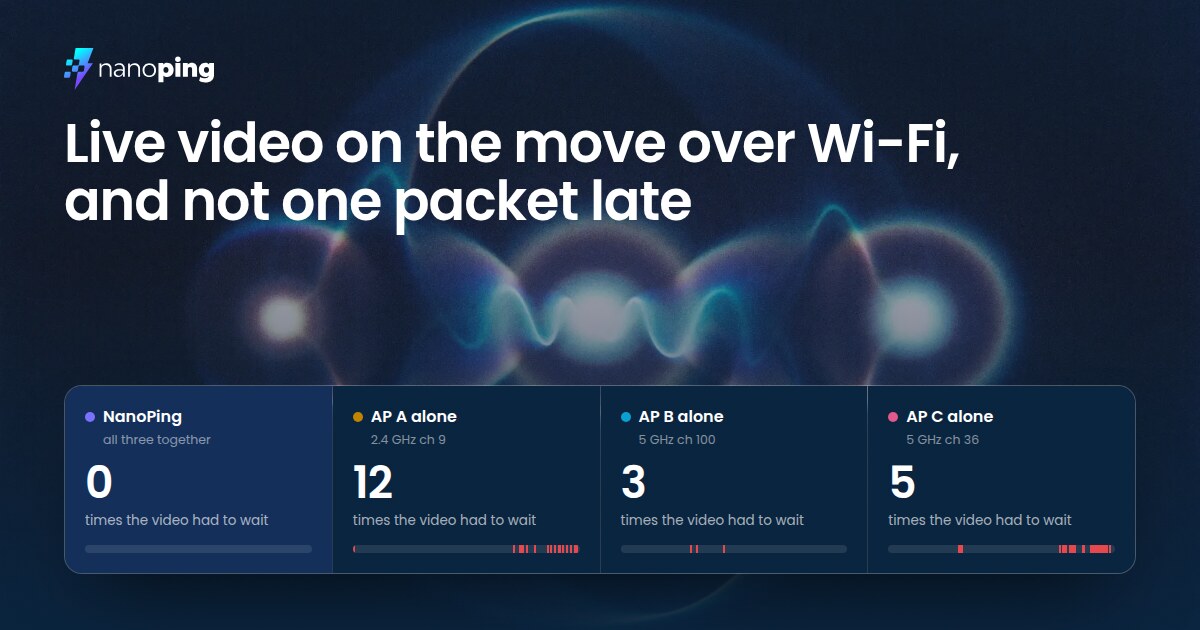
What the test did
A benchmark published by NanoPing, which reached the Hacker News front page, describes a simple scenario: a laptop streaming live video while being carried from one end of a 30 m lab to the other and back. No single access point covers the whole lab, so the test compares streaming over each of three Wi-Fi networks on its own against using all three simultaneously. The stream ran at 7 Mbit/s and 30 frames per second for 60 seconds — 43,980 packets in total — with success defined as every packet arriving within 100 ms.
The three access points sat on non-overlapping channels (2.4 GHz channel 9, 5 GHz channel 100 and 5 GHz channel 36), so they never competed for airtime, and the laptop carried one Wi-Fi adapter for each. Unusually, the same laptop was both ends of the stream: it sent the video over its three Wi-Fi adapters and received it back over its Ethernet port, through the router all three access points hang off. Because both ends shared one clock, per-packet travel times are exact, according to the write-up.
The numbers
Using all three networks at once, NanoPing reports 100% of packets arriving in time, zero of the 1,800 video frames late or lost, and a worst-case packet latency of 91 ms — just inside the budget. Half of all packets landed within 9 ms, 99 of 100 within 49 ms, and 999 of 1,000 within 87 ms.
Each network on its own did worse. AP A would have stalled the video 12 times for 5.8 s in total, AP B three times for 0.5 s, and AP C five times for 8.1 s, with slowest packets of 580 ms, 208 ms and 1,137 ms respectively. In-time rates were 97.89%, 99.87% and 91.48%, and up to 208 frames would have been late or lost on a single network. Crucially, per the benchmark, there was no moment in the whole minute when all three networks were too slow at the same time.
How it worked
Instead of the usual sticky-client behavior — clinging to one network until it degrades, then dropping and rejoining another — each adapter stayed connected to its own access point for the entire walk. NanoPing shifted traffic onto whichever links were healthy at each moment: during the windows when a given network alone would have been too slow, it was carrying almost none of the video (2% over AP A, 0% over AP B and AP C). It also covered for loss on the underlying links, re-sending 1,251 packets and transmitting 7,943 repair packets over the other networks; the three networks collectively lost 108 packets and delivered 2,429 more late, but none of that reached the video player.
The caveats
This is a vendor benchmark, and NanoPing flags its own limitations. The per-network figures are a floor rather than a forecast, because NanoPing handed each network only part of the stream, and the least when it was weak — a network carrying the full 7 Mbit/s alone would presumably have done worse. The network-only latency figures also cover just the network segment, while NanoPing's are measured application to application, which favors the networks. And one frame, 19 packets sent 31 seconds in, was dropped on the receiving machine rather than in transit, and is excluded from the results.
Why it matters
Roaming between access points is a longstanding weak spot for real-time applications: calls, cloud gaming and remote desktops stutter while a client re-associates. The benchmark's central claim is that with multiple radios and a scheduler that spreads, retransmits and repairs packets across links, handover disappears — the client never waits to switch networks. The exact figures should be treated as marketing-adjacent until independently reproduced, but the underlying technique is well established, and the unusually candid methodology notes make this a useful reference point for anyone building latency-sensitive apps that must survive movement.
- #wi-fi
- #networking
- #streaming
- #real-time
- #benchmark